Просмотр новости
Найдите то, что Вас интересует
 Спутники
 РН
РН SpaceX
 Роскосмос
 NASA
NASA
СпутникиРНSpaceXРоскосмосNASAHave a question that has not been answered before? Feel free to flick us an email at hello@piwik.org and we shall pop the answer up here for all to see. Thanks!
The post Track visitors from TikTok in Matomo appeared first on Analytics Platform - Matomo.
Matomo can track visitors who arrive from TikTok using campaign parameters or you can manually capture the TikTok click ID (ttclid). For organic traffic, TikTok does not send a standard HTTP referrer, so without campaign parameters, these visits may appear as Direct Entry in Matomo.
For TikTok Ads, TikTok automatically appends a ttclid parameter to the destination URL. While Matomo tracks the visit, the click ID is not stored for reporting unless you capture it manually.
This guide explains how to track TikTok traffic in Matomo using campaign parameters.
Track organic TikTok trafficTo ensure visits are attributed correctly in Matomo, add campaign parameters to the links that you share on TikTok. When visitors click the tagged link and arrive on your website, Matomo automatically attributes the visit to the campaign.
Without campaign parameters, these visits may appear as Direct Entry because TikTok does not always provide a standard HTTP referrer.
Create a campaign URLhttps://example.com/?utm_source=tiktok&utm_medium=social&utm_campaign=summer_sale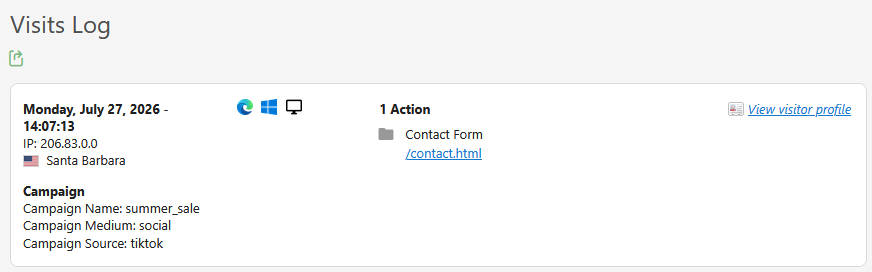
To analyse or export the ttclid value, manually capture it using a visit-scope Custom Dimension in the Matomo tracking code or in Matomo Tag Manager. Refer to the guide on manually capturing click IDs in Matomo.
If campaign parameters or the TikTok click ID are not suitable, consider these alternatives:
TIKTOKFREE in your TikTok content. You can then measure conversions by tracking coupon code usage in Matomo. See How to display coupon codes in Matomo for implementation guidance.Choose the tracking approach that best suits your needs. Campaign parameters are recommended for most websites, while the TikTok click ID, and other methods provide additional ways to analyse traffic and measure conversions.
Previous FAQ: How do I track user acquisition and social media activity with Matomo?
| # | Наименование новости | Тональность | Информативность | Дата публикации |
|---|---|---|---|---|
| 1 | Track Meta Pixel Events in Matomo Tag Manager | 0 | 8.59 | 22-07-2026 |
| 2 | Sample configuration files for high-traffic Matomo deployments | 0 | 11.54 | 13-07-2026 |
| 3 | Understanding row limits and ‘Others’ rows in Matomo reports | 0 | 8.33 | 17-07-2026 |
| 4 | Configure the Facebook (Meta) Pixel tag in Matomo Tag Manager | 0 | 7.52 | 22-07-2026 |
| 5 | I enabled Crash Analytics but don’t see any crashes | 0 | 9.72 | 29-07-2026 |
| 6 | AI Chatbots Real-time report | 0 | 13.5 | 13-07-2026 |
| 7 | How to merge and unmerge crashes | 0 | 8.49 | 29-07-2026 |
| 8 | Manually report errors with Matomo Tag Manager | 0 | 8.88 | 16-07-2026 |
| 9 | Manually report errors in Crash Analytics | 0 | 9.19 | 16-07-2026 |
| 10 | TikTok is still a danger. America no longer cares | -5 | 6 | 21-01-2026 |