Просмотр новости
Найдите то, что Вас интересует
 Спутники
 РН
РН SpaceX
 Роскосмос
 NASA
NASA
СпутникиРНSpaceXРоскосмосNASA9to5Mac Security Bite is exclusively brought to you by Mosyle, the only Apple Unified Platform. Making Apple devices work-ready and enterprise-safe is all we do. Our unique integrated approach to management and security combines state-of-the-art Apple-specific security solutions for fully automated Hardening & Compliance, Next Generation EDR, AI-powered Zero Trust, and exclusive Privilege Management with the most powerful and modern Apple MDM on the market. The result is a totally automated Apple Unified Platform currently trusted by over 45,000 organizations to make millions of Apple devices work-ready with no effort and at an affordable cost. Request your EXTENDED TRIALtoday and understand why Mosyle is everything you need to work with Apple.
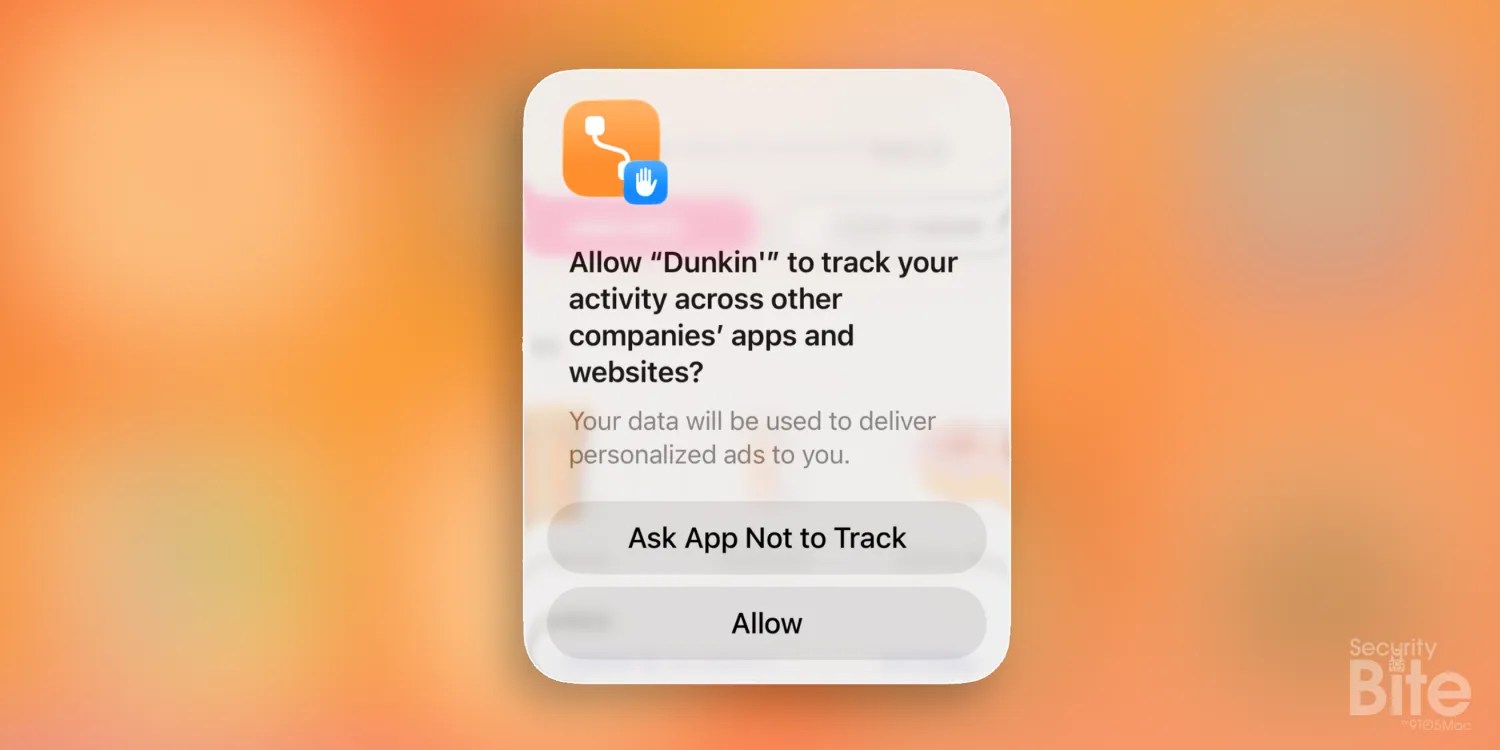
As Steve Jobs once said “Who wants a pop-up?[…] yuck.” Or was he referring to an iPhone stylus? Either way, if you’re an avid downloader of apps you probably get annoyed by the amount of app tracking prompts that appear. You know, the one asking whether you’ll let the app “track your activity across other companies’ apps and websites.” You tap “Ask App Not to Track” and move on, but minutes later another app shows you the same thing.
You’ll be glad to know there’s a way for iPhone to automatically default to “no” and never see these prompts again…
9to5Mac Security Bite is exclusively brought to you by Mosyle, the only Apple Unified Platform. Making Apple devices work-ready and enterprise-safe is all we do. Our unique integrated approach to management and security combines state-of-the-art Apple-specific security solutions for fully automated Hardening & Compliance, Next Generation EDR, AI-powered Zero Trust, and exclusive Privilege Management with the most powerful and modern Apple MDM on the market. The result is a totally automated Apple Unified Platform currently trusted by over 45,000 organizations to make millions of Apple devices work-ready with no effort and at an affordable cost. Request your EXTENDED TRIALtoday and understand why Mosyle is everything you need to work with Apple.
As Steve Jobs once said “Who wants a pop-up?[…] yuck.” Or was he referring to an iPhone stylus? Either way, if you’re an avid downloader of apps you probably get annoyed by the amount of app tracking prompts that appear. You know, the one asking whether you’ll let the app “track your activity across other companies’ apps and websites.” You tap “Ask App Not to Track” and move on, but minutes later another app shows you the same thing.
You’ll be glad to know there’s a way for iPhone to automatically default to “no” and never see these prompts again…
Behind the scenes, this is Apple’s App Tracking Transparency (ATT) framework at work. Introduced way back in iOS 14.5, when an app wants to access your device’s advertising identifier (IDFA) to follow you across other apps and websites, it has to ask first. This was a huge blow for Facebook and Instagram at the time, which even encouraged users to enable tracking so its apps remain ‘free of charge.’ The company lost an estimated $12.8 billion in just 2022 alone from iOS 14.5’s ATT implementation.
More importantly, it was a huge win for users privacy at the time. Before, apps had free range to collect your age, gender, location, usage patterns, purchases, browsing habits, which ads you clicked, and more. This is data gold to brokers looking to build a profile on you for targeted ads.
Today, device fingerprinting is the most widely used method and collects details like your screen size, OS version, time zone, and probably more. Apps have also switched to contextual advertising, tracking what you do inside their app rather than across apps.
Overall, both are less desirable than obtaining a user’s IDFA, which still sell to ad networks for big bucks. Protect your anonymity.
Fix to automatically default to “no”It’s important to note that toggling this setting off doesn’t just hide the prompt. It will tell the operating system to deny the request on your behalf, automatically.
Go to Settings > Privacy & Security > Tracking, and flip the “Allow Apps to Request to Track” toggle off.
That’s really it. Now every app on your iPhone now gets an automatic “no” the moment it tries to ask.
For developers, the API returns a denied permission state. For users, the tracking is denied before the prompt fires.
A pro tip for a quieter, more private experience on iPhone.
Security Bite is 9to5Mac’s weekly deep dive into the world of Apple security. Each week, Arin Waichulis unpacks new threats, privacy tips and concerns, vulnerabilities, and more, shaping an ecosystem of over 2 billion devices.
Follow Arin: Twitter/X,LinkedIn, Threads


FTC: We use income earning auto affiliate links. More.
| # | Наименование новости | Тональность | Информативность | Дата публикации |
|---|---|---|---|---|
| 1 | Security Bite Podcast: Apple is watching your taps | 0 | 12.09 | 16-07-2026 |
| 2 | Security Bite: This app tells you if your Mac’s webcam or mic was triggered while you were away | 0 | 11.77 | 24-04-2026 |
| 3 | Security Bite Podcast: WWDC26 security and privacy rundown, big changes coming for users and admins | 0 | 5 | 16-06-2026 |
| 4 | Security Bite Podcast: What’s hitting Macs so far in 2026, plus OBTS v9 preview (Part 2) | 0 | 13.85 | 09-09-2026 |
| 5 | Security Bite Podcast: Psylo app is setting out to change private browsing | 0 | 5 | 22-03-2026 |
| 6 | Security Bite Podcast: Why ClickFix is now the top way Macs get infected | 0 | 5 | 11-05-2026 |
| 7 | How German regulators are cracking down on App Tracking Transparency | 0 | 8.18 | 17-08-2026 |
| 8 | What will you do if Apple’s higher pricing turns out to be permanent? [Poll] | 0 | 9.93 | 17-07-2026 |
| 9 | Google Chrome: Agree to 'privacy feature', but get tracking! | 0 | 8.25 | 13-06-2024 |
| 10 | These are the best iPadOS 27 features you should try [Video] | 0 | 10.76 | 16-06-2026 |