Просмотр новости
Найдите то, что Вас интересует
 Спутники
 РН
РН SpaceX
 Роскосмос
 NASA
NASA
СпутникиРНSpaceXРоскосмосNASAMacworld
Apple announced the new M6 and M5 Pro Mac mini on August 25 and it started shipping on September 22, 2026. For most buyers, we recommend the M6 Mac mini. Starting at $899/£899 – up from $599 for the M4 generation – it offers improved performance for everyday work, coding and creative tasks. It is particularly appealing if you already own a monitor, keyboard and mouse, or are replacing an Intel Mac or early Apple silicon model.
The M5 Pro Mac mini is aimed at more demanding users. Its stronger multicore CPU and GPU, Thunderbolt 5, greater memory bandwidth and support for up to 64GB of unified memory make it better for professional creative work, development and larger local AI models. However, prices start at $1,699/£1,699 and rise quickly with upgrades.
We now have independent tests of both models. Our colleagues at Macwelt found that its M6 Mac mini was substantially faster than the M4, while our M5 Pro review found strong performance gains but questioned its value at the higher price. We discuss what those results mean for your choice below.
This guide explains whether to buy now, which model to choose, how much to pay, and the alternatives, drawbacks and refurbished options to consider.
Should you buy a Mac mini now?
It’s a good time to buy a Mac mini. With another significant update unlikely soon, there is little reason to wait if you need a compact desktop Mac.
If you were waiting to see independent benchmarks, we have tested the Mac mini M5 Pro and our German sister title Macwelt has reviewed the Mac mini M6, so we have the data that will help you make your decision.
There are reasons to wait though. Discounts are likely to improve in the months after launch, particularly around Prime Day in October and Black Friday in November, and more refurbished or discounted M4 models may appear as buyers upgrade. If you’re happy with your current Mac or simply want the lowest possible price, there is no need to rush.
You may prefer not to risk waiting. A global memory shortage contributed to long delivery times and limited availability for the previous generation, and similar supply constraints could affect the new models. The higher cost of memory and other components has also contributed to the Mac mini’s substantial price increase.
Buy Mac mini now if:
You need a Mac mini now and want the latest model.
You’re replacing an Intel Mac or an older Apple silicon Mac.
You want a powerful compact desktop for everyday, office, development or creative work.
The $899/£899 M6 Mac mini provides all the performance you need.
Consider M5 Pro if:
You need more than 32GB of unified memory.
You run demanding professional creative or development workloads.
You want to run larger local AI or LLM workloads.
You need Thunderbolt 5 or substantially greater memory bandwidth.
Wait if:
You’re hoping for discounts around Prime Day or Black Friday.
Your current Mac still meets your needs.
You don’t need a new Mac urgently and want to see whether prices fall.
Consider refurbished if:
You can find an M4 Mac mini at a significant discount.
You want the best value rather than the newest chip.
An Apple-refurbished M4 or M4 Pro configuration meets your memory and storage needs.
You’re comfortable waiting for refurbished M6 or M5 Pro stock to appear.
Apple Mac mini (M6, 2026)
Apple Mac mini (M5 Pro, 2026)
Read our review
Which Mac mini to buy: M6 or M5 Pro?
Foundry
The Mac mini lineup has changed significantly in 2026, with Apple introducing the M6 and M5 Pro models in August. The choice between them comes down to your workload and budget, as they serve very different audiences despite sharing the same compact design.
Apple sells two Mac mini models, both announced on August 25 and shipping from September 22, 2026:
Mac mini (M6) — starts at $899 / £899
12-core CPU, 12-core GPU
16GB unified memory (up to 32GB)
Up to 2TB SSD
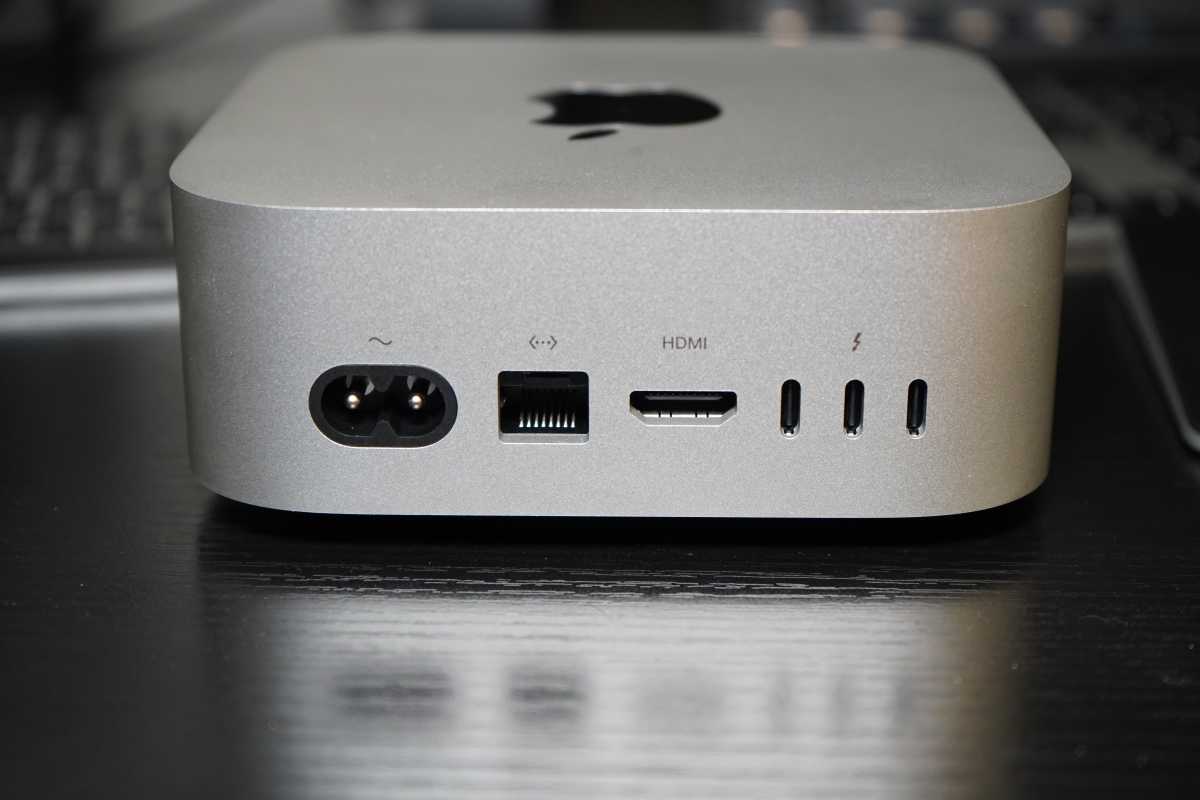
Thunderbolt 4 (three ports), two front USB-C ports, HDMI, 2.5Gb Ethernet (10Gb Ethernet optional)
Wi-Fi 7, Bluetooth 6 and Thread
Supports up to three displays (two 6K + one 5K)
Mac mini (M5 Pro) — starts at $1,699 / £1,699
15-core CPU, 16-core GPU (upgradeable to 18-core CPU, 20-core GPU for +$200)
24GB unified memory (up to 64GB)
Up to 8TB SSD
Thunderbolt 5 (three ports), two front USB-C ports, HDMI, 2.5Gb Ethernet (10Gb Ethernet optional)
Wi-Fi 7, Bluetooth 6 and Thread
Supports up to three 6K displays
Despite its older generation number, the M5 Pro is the stronger choice for heavily threaded CPU and GPU work. It has more CPU and GPU cores, supports up to 64GB of unified memory rather than the M6’s 32GB, and offers 307GB/s of memory bandwidth compared with 153GB/s or 170GB/s for the M6, depending on its memory configuration. It also has Thunderbolt 5. However, the M6 was faster in Macwelt’s single-core CPU and quantized Neural Engine test, so the better choice depends on your workload.
Choose the M6 Mac mini if:
You don’t need more than 32GB of unified memory (RAM).
You need a compact, powerful desktop for everyday use – web browsing, office work, photo editing, coding, and general productivity.
You’re a student or budget-conscious buyer looking for the best-value option for home offices, school or office use. Education pricing brings the starting price down to $799.
You already own a monitor, keyboard, and mouse.
You don’t need the extra performance or connectivity of the M5 Pro model.
Choose the M5 Pro Mac mini if:
You’re a developer, video editor, 3D artist, musician, or researcher who needs sustained performance for demanding workloads.
You want to run larger local AI models. The M5 Pro’s higher memory ceiling and much greater memory bandwidth make it better suited to heavier LLM workloads than the M6. If local AI is a priority, choose your memory carefully because it cannot be upgraded later.
You need Thunderbolt 5 for faster external storage, high-bandwidth peripherals or professional video workflows.
You regularly work with heavy 3D rendering, high-end video production, large codebases or scientific workloads.
You need more than 32GB of unified memory.
M6 versus M5 Pro comparison
M6 Mac miniM5 Pro Mac miniBest forEveryday work, coding and mainstream creative workSustained professional and AI workloadsStarting price$899/£899$1,699/£1,699Memory16GB–32GB24GB–64GBMemory bandwidth153GB/s or 170GB/s307GB/sStorageUp to 2TBUp to 8TBThunderboltThunderbolt 4Thunderbolt 5DisplaysTwo 6K plus one 5KThree 6KOur verdictBest choice for most peopleBuy only if your workload requires it
Should you upgrade from an M4 or M4 Pro Mac mini?
Upgrade from an M4 Mac mini? The M6 is a substantial performance upgrade. In Macwelt’s tests, its 24GB/512GB M6 mini scored about 24 percent higher in Geekbench 7 single-core and 45 percent higher in multicore than the M4, with much larger gains in some GPU tests. But if your M4 already handles your work comfortably, those results alone are not a reason to replace it. Consider upgrading if its performance is holding up your work, or if you specifically need Wi-Fi 7, Bluetooth 6 or standard 2.5Gb Ethernet.
Upgrade from an M4 Pro Mac mini? The M5 Pro is faster, particularly in multicore work, but it is an expensive upgrade from a recent machine. In our tests of an upgraded M5 Pro mini, Geekbench 7 single-core performance improved by 12 percent, multicore by 38 percent and GPU compute by around 20 percent over the tested M4 Pro. Our review concluded that the higher price makes upgrading difficult to justify unless the time saved in your workload matters to you.
How much should you pay for Mac mini?
M6 Mac mini, starting at $899.
M5 Pro Mac mini, starting at $1,699.
Since the August 2026 update, the Mac mini is no longer the budget Mac it once was. The M6 model starts at $899, $300 more than the $599 starting price of the M4 generation.
For most people, the $899 M6 Mac mini is the model to buy. It offers more than enough performance for everyday work, browsing, media and general productivity, although the standard 16GB of unified memory and 256GB SSD may feel limiting if you plan to keep it for several years.
If you need more demanding performance for creative work, development or larger local AI models, the M5 Pro Mac mini starts at $1,699. Upgrades can quickly push its price towards $3,000: the model we reviewed, with the full M5 Pro chip, 48GB of memory, a 1TB SSD and 10Gb Ethernet, would cost $2,899. That’s $100 more than an M5 Max Mac Studio configuration with a more powerful GPU and more ports, although that Studio has 36GB of memory rather than 48GB. Compare the configurations you actually need before choosing the mini.
Be cautious about spending heavily on Apple’s storage upgrades. External SSDs and Mac mini hubs with NVMe storage can provide considerably more capacity for less money.
For most buyers, we recommend spending around $899 on the M6 Mac mini. Move up to the M5 Pro only if you need its its stronger multicore CPU or GPU performance or significantly more memory.
Discounts are likely to appear at Amazon and other resellers over time, particularly around Prime Day in October and Black Friday in November. For now, the best bargain may be a discounted M4 Mac mini, although remaining stock is likely to be limited.
Find Apple on Amazon U.S.
Find Apple on Amazon U.K.
Students can save $100 through Apple’s Education Store, reducing the M6 Mac mini to $799 and the M5 Pro model to $1,599. Apple’s Refurbished Store is another way to save, although it may be some time before the new M6 and M5 Pro models appear there. Read: How to get an Apple student discount at Apple’s Education Store and Should you buy a refurbished Mac.
Reasons to buy a Mac mini
Foundry
Excellent value: The price has gone up, but the Mac mini remains one of the most versatile and cost-effective ways to enter the macOS ecosystem. Even at the new starting price of $899, the Mac mini still delivers excellent performance per dollar. That balance of price, power, and efficiency is one of the main reasons for the desktop’s growing popularity. It also offers access to professional-grade performance for significantly less cash than a similarly specced MacBook Pro.
Long software support window: The M6 and M5 Pro Mac mini will have a long usable lifespan and will receive many years of macOS updates and security support.
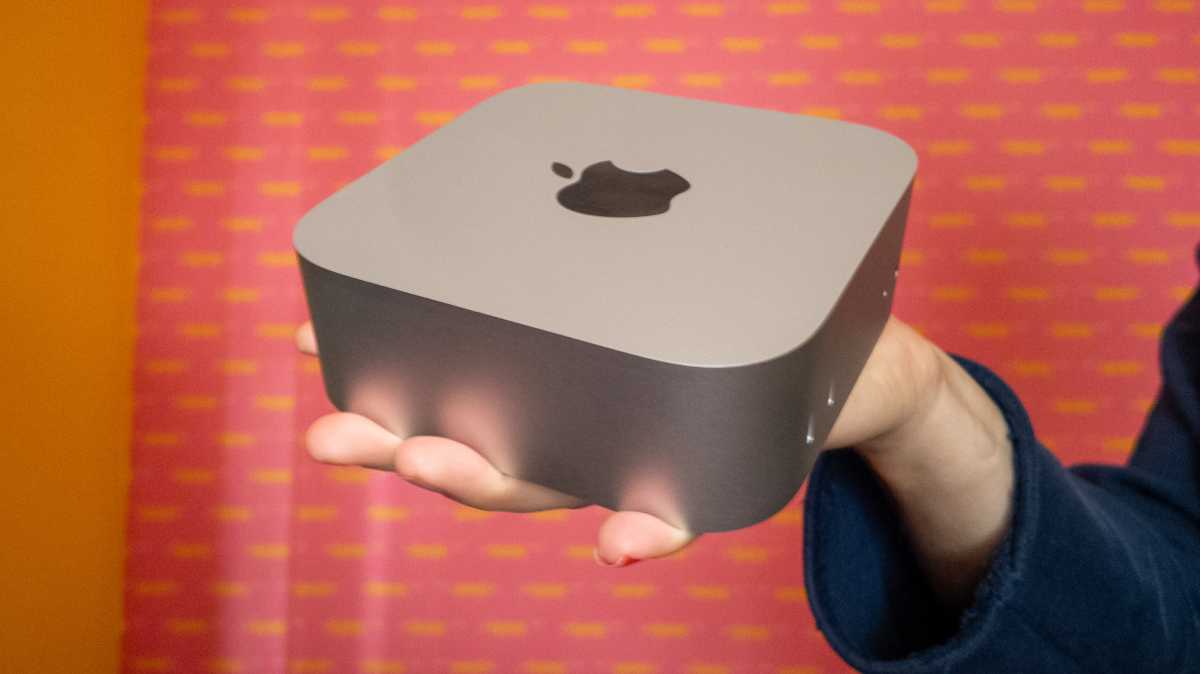
Compact desktop footprint: The Mac mini’s ultra-compact 5-inch square design makes it one of the most space-efficient desktop computers available. It fits easily under monitors, in small offices, or in minimalist workstation setups. Its compact form factor also makes it particularly attractive for server racks, home labs, and multi-machine deployments.
Retail discounts and refurbished deals: Despite already offering strong value at full price, the Mac mini is occasionally discounted by third-party retailers. If you can find a Mac mini deal – even on a M4 model with a higher-memory configuration – we recommend taking advantage of it. The Apple Refurbished Store can offer even better value, assuming stock is available. In the past, we have seen the M4 Mac mini discounted by around $100/£100, while M4 Pro models have dropped by approximately $200/£210. If deals like these reappear, they are likely worth considering.
Reasons not to buy Mac mini
The price has gone up significantly: The Mac mini was once the undisputed budget Mac, but that is much harder to say now. The entry-level model has risen sharply in price, making it less compelling for buyers primarily looking for the cheapest way into the Mac ecosystem. At $899, the latest Mac mini is still less expensive than a MacBook or iMac, but it no longer feels like the bargain it once was.
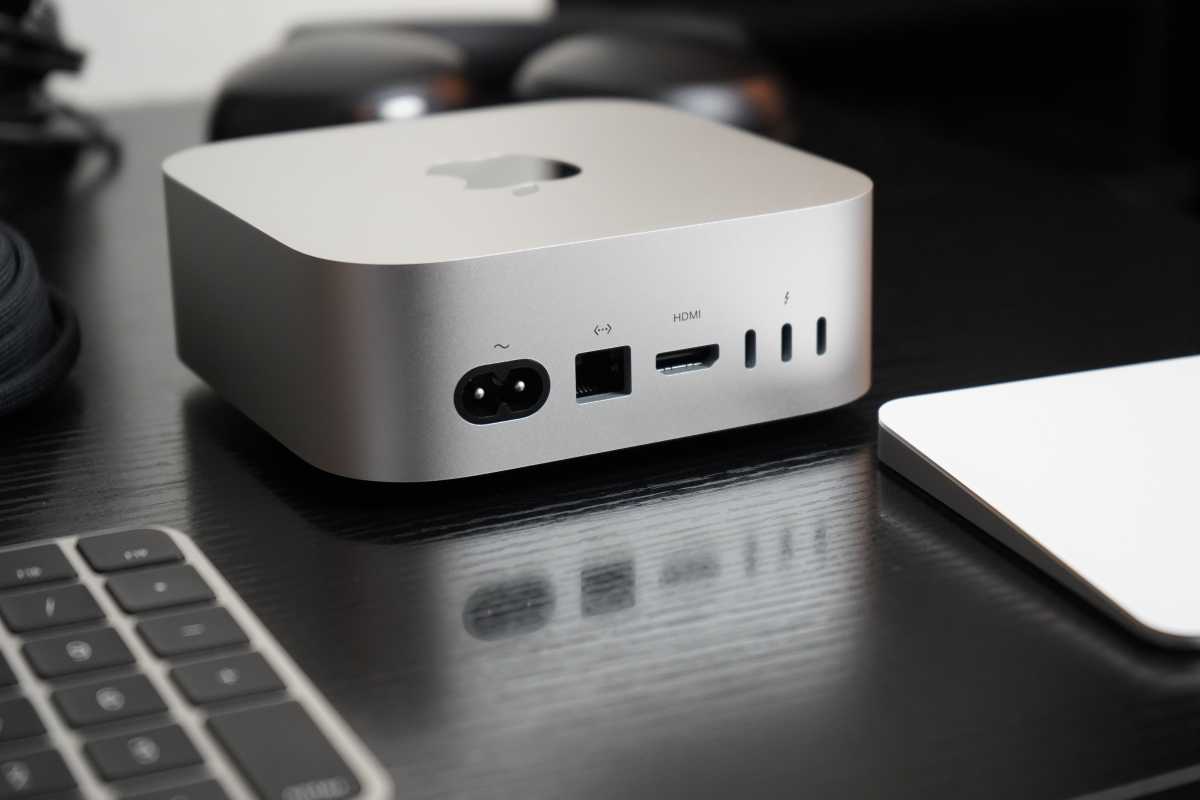
You need to buy your own peripherals: The Mac mini is a “BYODKM” – Bring Your Own Display, Keyboard and Mouse – computer. That’s central to its appeal if you already own those accessories, but it can add substantially to the cost if you don’t. Unlike an iMac or MacBook, the Mac mini doesn’t include a display, keyboard or mouse. Buying all three can easily add hundreds of dollars to the overall price. The latest models also lack USB-A ports, so you may need adapters or a hub if you still use older accessories.
It’s not portable: The Mac mini is a desktop computer, so it isn’t suitable if you need to work in different locations. You can’t easily take it to a lecture, meeting or coffee shop in the way you can a MacBook. For students, frequent travellers or anyone who regularly works away from a desk, a laptop is likely to be the better choice.
You can’t upgrade it later: You need to choose your memory and storage carefully when you buy because neither can be upgraded afterwards. Apple’s build-to-order memory and storage upgrades can also be expensive, particularly once you start moving beyond the base configuration. This can quickly push the Mac mini into MacBook Pro or Mac Studio territory. Storage is less of a concern because inexpensive external SSDs and Mac mini hubs with NVMe storage can add capacity later, but there is no equivalent workaround for unified memory.
Availability could be limited: New Mac launches can sometimes bring longer delivery times for popular configurations, particularly higher-memory or build-to-order models. The M6 and M5 Pro Mac mini may suffer significant shortages due to their popularity and the shortage of components and memory.
It’s not ideal for every AI workload: Apple is increasingly positioning its Macs for AI workloads, with the M6 GPU’s Neural Accelerators and dual 16-core Neural Engine, but as our colleagues at PCWorld explain, the Mac mini has some limitations if running large local models is your main priority. The standard M6 Mac mini tops out at 32GB of unified memory, which may be restrictive for particularly large local models. The M5 Pro model offers more memory, but higher-spec configurations become expensive quickly. There is also no support for Nvidia’s CUDA platform. Many professional AI and machine-learning tools are optimized around CUDA and Nvidia GPUs, so a Windows or Linux PC with a suitable Nvidia graphics card may be faster or better supported for some workloads. For general Apple Intelligence features and lighter local AI use, however, this shouldn’t be a concern.
What to avoid when buying a Mac mini
Ida Blix
Intel: Avoid Intel-powered Mac mini models – when shopping for a refurbished Mac mini, prioritize models with Apple Silicon (M-series chips).
Low RAM: We advise avoiding 8GB RAM models if possible, as newer generations now start with 16GB as the base standard.
Check status: Check whether an older model is classified as vintage or obsolete. Service for vintage Macs depends on parts availability, while Apple generally ends hardware service for obsolete Macs. See: How long do Macs last.
Is Mac mini right for you?
Is the Mac mini the best choice for you? There are a number of trade-offs to consider.
FeatureConsiderationPortabilityNot portable; requires separate monitor, keyboard, and mouse.ConnectivityLacks USB-A ports; may require adapters for older accessories. The M5 Pro Mac mini features three Thunderbolt 5 ports, while the standard M6 model uses Thunderbolt 4. UpgradabilityUnified memory and internal storage cannot be upgraded by the user after purchase.
Who is the Mac mini best for?
UserRecommendationStudent, office work, web devBuy M6 Mac mini (or M4 if a refurbished model is available)Creative work (photo/video)M6 for mainstream photo/video work; M5 Pro for sustained professional workloadsLocal AI / LLM workloadsM5 Pro with as much unified memory as the workload requiresExisting M1/M2 Mac mini ownerConsider M6 if performance, display support, connectivity or memory limits justify upgradingExisting M4/M4 Pro Mac mini ownerKeep it if it meets your needs; upgrade for a specific performance, memory or connectivity limitationIntel Mac ownerBuy M6 Mac mini
Mac mini vs Mac Studio: Which should you buy?
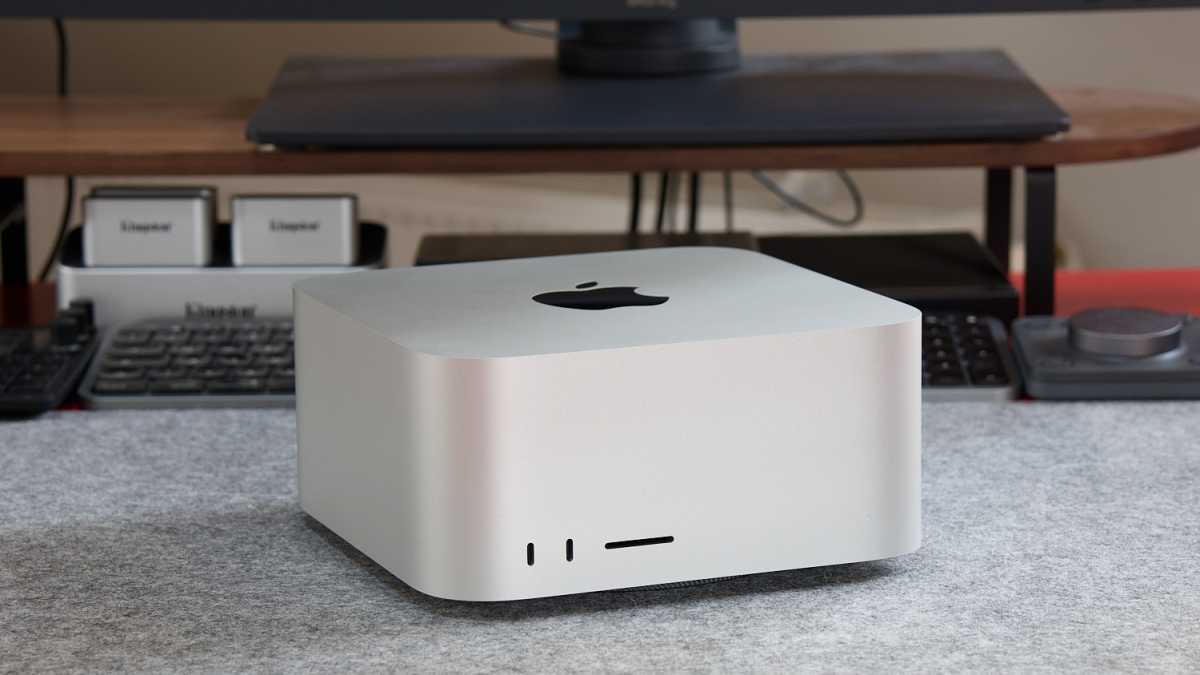
The Mac Studio is an even more powerful option.Thomas Bergbold
The choice between the Mac mini and the Mac Studio largely comes down to whether you prioritize value or maximum performance.
The M6 Mac mini offers strong value for buyers who already have a display and peripherals. The M5 Pro can also make sense for demanding work, but compare its configured price with a Mac Studio before ordering.
The Mac Studio is designed for users who need workstation-class performance. Following the discontinuation of the Mac Pro, it is now effectively Apple’s most powerful desktop. Starting at $2,499/£2,499 for the M5 Max configuration, the Mac Studio also represents the most affordable way to get a Max-series Apple Silicon chip (which starts at $4,099/£4,099 if you buy a MacBook Pro). It is well suited to professional video production, large AI models, 3D rendering, and other heavily multi-threaded or GPU-intensive workflows.
For most users, the Mac mini is a better value purchase. However, if your workloads demand high performance, more memory and a more powerful GPU, the Mac Studio is the better choice.
Mac mini vs MacBook Neo: Which is better value?
Thomas Armbrüster
Before the introduction of the MacBook Neo, the Mac mini was Apple’s least expensive Mac. That is no longer the case – particularly now Apple has raised the price of the entry-level Mac mini from $599/£599 to $899/£899.
The MacBook Neo is now Apple’s most affordable Mac, starting at $699/£699. It is designed as an entry-level Mac and is powered by the A18 Pro chip originally used for the iPhone 16 Pro and only offers 8GB memory. The focus is on portability, battery life, and affordability rather than performance.
The Mac mini, by contrast, remains Apple’s best-value desktop Mac for users who already own a monitor, keyboard, and mouse. Thanks to its M6 and M5 Pro chips, active cooling system, and greater performance, it is better suited to demanding workloads such as coding, creative applications, multitasking, and local AI development.
Where to buy a Mac mini
If you’re looking to buy a Mac mini, you can choose between Apple, third-party retailers and refurbished outlets.
Apple: You can buy a Mac mini directly from the Apple Store online or at an Apple retail store.
Apple Education Store: Apple also offers discounted education pricing for eligible students and educators via its Education Store. For example, the $899 M6 Mac mini costs $799 with education pricing.
Third-Party Resellers: It’s worth checking third-party retailers as well as Apple, as stores such as Amazon and B&H frequently discount Macs. Authorized resellers and major retailers often sell the Mac mini at less than Apple’s list price.
In the U.S., retailers include:
Amazon
Best Buy
B&H Photo Video
Costco
Adorama
DataVision
In the U.K., retailers include:
Amazon
Argos
Currys
John Lewis
AO
Ebuyer
Laptops Direct
The U.K. also has Apple Premium Resellers including KRCS, iStore, Select, Albion and Jigsaw.
Should you buy a refurbished Mac mini?
A refurbished Mac mini can be an excellent way to save money, particularly if you don’t need the latest model. Discounts can be significant, although the exact saving depends on the model, configuration and seller.
The best place to start is Apple’s Refurbished Store. Apple’s refurbished Macs are fully tested, cleaned and inspected, and come with a one-year limited warranty, 90 days of technical support and eligibility for AppleCare. They are also supplied with the appropriate accessories and repackaged in a new box.
Earlier in 2026, we saw refurbished M4 Mac mini models discounted by around $90/£90, with savings also available on the M4 Pro version. However, as of September 2026, refurbished Mac mini stock is very limited. M4 models are currently unavailable, and it may be some time before the new M6 and M5 Pro models start appearing in Apple’s refurbished store.
Availability is one of the main drawbacks of buying refurbished. Stock depends on returns and trade-ins, so you may not find the exact memory or storage configuration you want. More models may become available as owners upgrade to the latest Mac minis and older machines make their way to refurbishers.
You should also be careful when buying from third-party sellers. Refurbishment standards and warranties can vary, and marketplaces may contain much older Intel-based Mac minis. We generally wouldn’t recommend those models now unless the price is exceptionally low, as Apple silicon Mac minis offer much better performance and will receive software support for longer.
We’ve found Amazon particularly worth checking carefully. Refurbished stock can be dominated by Mac minis from 2020 or earlier, and we’ve even seen discontinued configurations listed for more than their original selling price. Always check the model year, specification and price of an equivalent new Mac before buying.
Buying refurbished is generally safer than buying second hand from a private seller. A reputable refurbished Mac should have been inspected and tested and will usually include a warranty and returns policy. A privately sold Mac may offer neither, and there is also a risk of Activation Lock if the previous owner hasn’t properly removed the Mac from their Apple Account.
Where to buy a refurbished Mac mini
U.S.: Amazon, Back Market, Best Buy, GainSaver, Mac of All Trades and Refurb.me.
U.K.: Affordable Mac, Amazon, Back Market, Hoxton Macs, MacFinder, Mac4Sale and MusicMagpie.
Read our guide to the pros and cons of buying refurbished Macs. We also have recommendations of the best places to buy a refurbished Mac.
Apple announced the new M6 and M5 Pro Mac mini on August 25 and it started shipping on September 22, 2026. For most buyers, we recommend the M6 Mac mini. Starting at $899/£899 – up from $599 for the M4 generation – it offers improved performance for everyday work, coding and creative tasks. It is particularly appealing if you already own a monitor, keyboard and mouse, or are replacing an Intel Mac or early Apple silicon model.
The M5 Pro Mac mini is aimed at more demanding users. Its stronger multicore CPU and GPU, Thunderbolt 5, greater memory bandwidth and support for up to 64GB of unified memory make it better for professional creative work, development and larger local AI models. However, prices start at $1,699/£1,699 and rise quickly with upgrades.
We now have independent tests of both models. Our colleagues at Macwelt found that its M6 Mac mini was substantially faster than the M4, while our M5 Pro review found strong performance gains but questioned its value at the higher price. We discuss what those results mean for your choice below.
This guide explains whether to buy now, which model to choose, how much to pay, and the alternatives, drawbacks and refurbished options to consider.
It’s a good time to buy a Mac mini. With another significant update unlikely soon, there is little reason to wait if you need a compact desktop Mac.
If you were waiting to see independent benchmarks, we have tested the Mac mini M5 Pro and our German sister title Macwelt has reviewed the Mac mini M6, so we have the data that will help you make your decision.
There are reasons to wait though. Discounts are likely to improve in the months after launch, particularly around Prime Day in October and Black Friday in November, and more refurbished or discounted M4 models may appear as buyers upgrade. If you’re happy with your current Mac or simply want the lowest possible price, there is no need to rush.
You may prefer not to risk waiting. A global memory shortage contributed to long delivery times and limited availability for the previous generation, and similar supply constraints could affect the new models. The higher cost of memory and other components has also contributed to the Mac mini’s substantial price increase.
Buy Mac mini now if:
Consider M5 Pro if:
Wait if:
Consider refurbished if:
Foundry
The Mac mini lineup has changed significantly in 2026, with Apple introducing the M6 and M5 Pro models in August. The choice between them comes down to your workload and budget, as they serve very different audiences despite sharing the same compact design.
Apple sells two Mac mini models, both announced on August 25 and shipping from September 22, 2026:
Mac mini (M6) — starts at $899 / £899Despite its older generation number, the M5 Pro is the stronger choice for heavily threaded CPU and GPU work. It has more CPU and GPU cores, supports up to 64GB of unified memory rather than the M6’s 32GB, and offers 307GB/s of memory bandwidth compared with 153GB/s or 170GB/s for the M6, depending on its memory configuration. It also has Thunderbolt 5. However, the M6 was faster in Macwelt’s single-core CPU and quantized Neural Engine test, so the better choice depends on your workload.
Choose the M6 Mac mini if:| M6 Mac mini | M5 Pro Mac mini | |
|---|---|---|
| Best for | Everyday work, coding and mainstream creative work | Sustained professional and AI workloads |
| Starting price | $899/£899 | $1,699/£1,699 |
| Memory | 16GB–32GB | 24GB–64GB |
| Memory bandwidth | 153GB/s or 170GB/s | 307GB/s |
| Storage | Up to 2TB | Up to 8TB |
| Thunderbolt | Thunderbolt 4 | Thunderbolt 5 |
| Displays | Two 6K plus one 5K | Three 6K |
| Our verdict | Best choice for most people | Buy only if your workload requires it |
Upgrade from an M4 Mac mini? The M6 is a substantial performance upgrade. In Macwelt’s tests, its 24GB/512GB M6 mini scored about 24 percent higher in Geekbench 7 single-core and 45 percent higher in multicore than the M4, with much larger gains in some GPU tests. But if your M4 already handles your work comfortably, those results alone are not a reason to replace it. Consider upgrading if its performance is holding up your work, or if you specifically need Wi-Fi 7, Bluetooth 6 or standard 2.5Gb Ethernet.
Upgrade from an M4 Pro Mac mini? The M5 Pro is faster, particularly in multicore work, but it is an expensive upgrade from a recent machine. In our tests of an upgraded M5 Pro mini, Geekbench 7 single-core performance improved by 12 percent, multicore by 38 percent and GPU compute by around 20 percent over the tested M4 Pro. Our review concluded that the higher price makes upgrading difficult to justify unless the time saved in your workload matters to you.
Since the August 2026 update, the Mac mini is no longer the budget Mac it once was. The M6 model starts at $899, $300 more than the $599 starting price of the M4 generation.
For most people, the $899 M6 Mac mini is the model to buy. It offers more than enough performance for everyday work, browsing, media and general productivity, although the standard 16GB of unified memory and 256GB SSD may feel limiting if you plan to keep it for several years.
If you need more demanding performance for creative work, development or larger local AI models, the M5 Pro Mac mini starts at $1,699. Upgrades can quickly push its price towards $3,000: the model we reviewed, with the full M5 Pro chip, 48GB of memory, a 1TB SSD and 10Gb Ethernet, would cost $2,899. That’s $100 more than an M5 Max Mac Studio configuration with a more powerful GPU and more ports, although that Studio has 36GB of memory rather than 48GB. Compare the configurations you actually need before choosing the mini.
Be cautious about spending heavily on Apple’s storage upgrades. External SSDs and Mac mini hubs with NVMe storage can provide considerably more capacity for less money.
For most buyers, we recommend spending around $899 on the M6 Mac mini. Move up to the M5 Pro only if you need its its stronger multicore CPU or GPU performance or significantly more memory.
Discounts are likely to appear at Amazon and other resellers over time, particularly around Prime Day in October and Black Friday in November. For now, the best bargain may be a discounted M4 Mac mini, although remaining stock is likely to be limited.
Students can save $100 through Apple’s Education Store, reducing the M6 Mac mini to $799 and the M5 Pro model to $1,599. Apple’s Refurbished Store is another way to save, although it may be some time before the new M6 and M5 Pro models appear there. Read: How to get an Apple student discount at Apple’s Education Store and Should you buy a refurbished Mac.
Foundry
Excellent value: The price has gone up, but the Mac mini remains one of the most versatile and cost-effective ways to enter the macOS ecosystem. Even at the new starting price of $899, the Mac mini still delivers excellent performance per dollar. That balance of price, power, and efficiency is one of the main reasons for the desktop’s growing popularity. It also offers access to professional-grade performance for significantly less cash than a similarly specced MacBook Pro.
Long software support window: The M6 and M5 Pro Mac mini will have a long usable lifespan and will receive many years of macOS updates and security support.
Compact desktop footprint: The Mac mini’s ultra-compact 5-inch square design makes it one of the most space-efficient desktop computers available. It fits easily under monitors, in small offices, or in minimalist workstation setups. Its compact form factor also makes it particularly attractive for server racks, home labs, and multi-machine deployments.
Retail discounts and refurbished deals: Despite already offering strong value at full price, the Mac mini is occasionally discounted by third-party retailers. If you can find a Mac mini deal – even on a M4 model with a higher-memory configuration – we recommend taking advantage of it. The Apple Refurbished Store can offer even better value, assuming stock is available. In the past, we have seen the M4 Mac mini discounted by around $100/£100, while M4 Pro models have dropped by approximately $200/£210. If deals like these reappear, they are likely worth considering.
The price has gone up significantly: The Mac mini was once the undisputed budget Mac, but that is much harder to say now. The entry-level model has risen sharply in price, making it less compelling for buyers primarily looking for the cheapest way into the Mac ecosystem. At $899, the latest Mac mini is still less expensive than a MacBook or iMac, but it no longer feels like the bargain it once was.
You need to buy your own peripherals: The Mac mini is a “BYODKM” – Bring Your Own Display, Keyboard and Mouse – computer. That’s central to its appeal if you already own those accessories, but it can add substantially to the cost if you don’t. Unlike an iMac or MacBook, the Mac mini doesn’t include a display, keyboard or mouse. Buying all three can easily add hundreds of dollars to the overall price. The latest models also lack USB-A ports, so you may need adapters or a hub if you still use older accessories.
It’s not portable: The Mac mini is a desktop computer, so it isn’t suitable if you need to work in different locations. You can’t easily take it to a lecture, meeting or coffee shop in the way you can a MacBook. For students, frequent travellers or anyone who regularly works away from a desk, a laptop is likely to be the better choice.
You can’t upgrade it later: You need to choose your memory and storage carefully when you buy because neither can be upgraded afterwards. Apple’s build-to-order memory and storage upgrades can also be expensive, particularly once you start moving beyond the base configuration. This can quickly push the Mac mini into MacBook Pro or Mac Studio territory. Storage is less of a concern because inexpensive external SSDs and Mac mini hubs with NVMe storage can add capacity later, but there is no equivalent workaround for unified memory.
Availability could be limited: New Mac launches can sometimes bring longer delivery times for popular configurations, particularly higher-memory or build-to-order models. The M6 and M5 Pro Mac mini may suffer significant shortages due to their popularity and the shortage of components and memory.
It’s not ideal for every AI workload: Apple is increasingly positioning its Macs for AI workloads, with the M6 GPU’s Neural Accelerators and dual 16-core Neural Engine, but as our colleagues at PCWorld explain, the Mac mini has some limitations if running large local models is your main priority. The standard M6 Mac mini tops out at 32GB of unified memory, which may be restrictive for particularly large local models. The M5 Pro model offers more memory, but higher-spec configurations become expensive quickly. There is also no support for Nvidia’s CUDA platform. Many professional AI and machine-learning tools are optimized around CUDA and Nvidia GPUs, so a Windows or Linux PC with a suitable Nvidia graphics card may be faster or better supported for some workloads. For general Apple Intelligence features and lighter local AI use, however, this shouldn’t be a concern.
Ida Blix
Intel: Avoid Intel-powered Mac mini models – when shopping for a refurbished Mac mini, prioritize models with Apple Silicon (M-series chips).
Low RAM: We advise avoiding 8GB RAM models if possible, as newer generations now start with 16GB as the base standard.
Check status: Check whether an older model is classified as vintage or obsolete. Service for vintage Macs depends on parts availability, while Apple generally ends hardware service for obsolete Macs. See: How long do Macs last.
Is the Mac mini the best choice for you? There are a number of trade-offs to consider.
| Feature | Consideration |
|---|---|
| Portability | Not portable; requires separate monitor, keyboard, and mouse. |
| Connectivity | Lacks USB-A ports; may require adapters for older accessories. The M5 Pro Mac mini features three Thunderbolt 5 ports, while the standard M6 model uses Thunderbolt 4. |
| Upgradability | Unified memory and internal storage cannot be upgraded by the user after purchase. |
| User | Recommendation |
|---|---|
| Student, office work, web dev | Buy M6 Mac mini (or M4 if a refurbished model is available) |
| Creative work (photo/video) | M6 for mainstream photo/video work; M5 Pro for sustained professional workloads |
| Local AI / LLM workloads | M5 Pro with as much unified memory as the workload requires |
| Existing M1/M2 Mac mini owner | Consider M6 if performance, display support, connectivity or memory limits justify upgrading |
| Existing M4/M4 Pro Mac mini owner | Keep it if it meets your needs; upgrade for a specific performance, memory or connectivity limitation |
| Intel Mac owner | Buy M6 Mac mini |
 The Mac Studio is an even more powerful option.
Thomas Bergbold
The choice between the Mac mini and the Mac Studio largely comes down to whether you prioritize value or maximum performance.
The M6 Mac mini offers strong value for buyers who already have a display and peripherals. The M5 Pro can also make sense for demanding work, but compare its configured price with a Mac Studio before ordering.
The Mac Studio is designed for users who need workstation-class performance. Following the discontinuation of the Mac Pro, it is now effectively Apple’s most powerful desktop. Starting at $2,499/£2,499 for the M5 Max configuration, the Mac Studio also represents the most affordable way to get a Max-series Apple Silicon chip (which starts at $4,099/£4,099 if you buy a MacBook Pro). It is well suited to professional video production, large AI models, 3D rendering, and other heavily multi-threaded or GPU-intensive workflows.
For most users, the Mac mini is a better value purchase. However, if your workloads demand high performance, more memory and a more powerful GPU, the Mac Studio is the better choice.
Thomas Armbrüster
Before the introduction of the MacBook Neo, the Mac mini was Apple’s least expensive Mac. That is no longer the case – particularly now Apple has raised the price of the entry-level Mac mini from $599/£599 to $899/£899.
The MacBook Neo is now Apple’s most affordable Mac, starting at $699/£699. It is designed as an entry-level Mac and is powered by the A18 Pro chip originally used for the iPhone 16 Pro and only offers 8GB memory. The focus is on portability, battery life, and affordability rather than performance.
The Mac mini, by contrast, remains Apple’s best-value desktop Mac for users who already own a monitor, keyboard, and mouse. Thanks to its M6 and M5 Pro chips, active cooling system, and greater performance, it is better suited to demanding workloads such as coding, creative applications, multitasking, and local AI development.
If you’re looking to buy a Mac mini, you can choose between Apple, third-party retailers and refurbished outlets.
Apple: You can buy a Mac mini directly from the Apple Store online or at an Apple retail store.
Apple Education Store: Apple also offers discounted education pricing for eligible students and educators via its Education Store. For example, the $899 M6 Mac mini costs $799 with education pricing.
Third-Party Resellers: It’s worth checking third-party retailers as well as Apple, as stores such as Amazon and B&H frequently discount Macs. Authorized resellers and major retailers often sell the Mac mini at less than Apple’s list price.
In the U.S., retailers include:
In the U.K., retailers include:
The U.K. also has Apple Premium Resellers including KRCS, iStore, Select, Albion and Jigsaw.
A refurbished Mac mini can be an excellent way to save money, particularly if you don’t need the latest model. Discounts can be significant, although the exact saving depends on the model, configuration and seller.
The best place to start is Apple’s Refurbished Store. Apple’s refurbished Macs are fully tested, cleaned and inspected, and come with a one-year limited warranty, 90 days of technical support and eligibility for AppleCare. They are also supplied with the appropriate accessories and repackaged in a new box.
Earlier in 2026, we saw refurbished M4 Mac mini models discounted by around $90/£90, with savings also available on the M4 Pro version. However, as of September 2026, refurbished Mac mini stock is very limited. M4 models are currently unavailable, and it may be some time before the new M6 and M5 Pro models start appearing in Apple’s refurbished store.
Availability is one of the main drawbacks of buying refurbished. Stock depends on returns and trade-ins, so you may not find the exact memory or storage configuration you want. More models may become available as owners upgrade to the latest Mac minis and older machines make their way to refurbishers.
You should also be careful when buying from third-party sellers. Refurbishment standards and warranties can vary, and marketplaces may contain much older Intel-based Mac minis. We generally wouldn’t recommend those models now unless the price is exceptionally low, as Apple silicon Mac minis offer much better performance and will receive software support for longer.
We’ve found Amazon particularly worth checking carefully. Refurbished stock can be dominated by Mac minis from 2020 or earlier, and we’ve even seen discontinued configurations listed for more than their original selling price. Always check the model year, specification and price of an equivalent new Mac before buying.
Buying refurbished is generally safer than buying second hand from a private seller. A reputable refurbished Mac should have been inspected and tested and will usually include a warranty and returns policy. A privately sold Mac may offer neither, and there is also a risk of Activation Lock if the previous owner hasn’t properly removed the Mac from their Apple Account.
Where to buy a refurbished Mac miniU.S.: Amazon, Back Market, Best Buy, GainSaver, Mac of All Trades and Refurb.me.
U.K.: Affordable Mac, Amazon, Back Market, Hoxton Macs, MacFinder, Mac4Sale and MusicMagpie.
Read our guide to the pros and cons of buying refurbished Macs. We also have recommendations of the best places to buy a refurbished Mac.
| # | Наименование новости | Тональность | Информативность | Дата публикации |
|---|---|---|---|---|
| 1 | Mac mini (M5 Pro) review: Killer performance at a lethal price | 0 | 21.33 | 22-09-2026 |
| 2 | M6 and M5 Pro Mac mini take a step back on third-party storage upgrades | 0 | 22.3 | 23-09-2026 |
| 3 | New Mac Mini 2026: Release Date, Price, Specs and What to Expect | 0 | 10.06 | 27-08-2026 |
| 4 | 2026 Mac mini rumor roundup: Not the usual speed boost | 0 | 22.18 | 02-08-2026 |
| 5 | Apple представила новые Mac mini: базовая модель получила чип M6, а старшая — M5 Pro | 0 | 7.7 | 25-08-2026 |
| 6 | 9to5Mac Overtime 079: The $899 Mac mini | 0 | 11.9 | 28-08-2026 |
| 7 | 9to5Mac Daily: August 25, 2026 – New Mac mini and Mac Studio unveiled | 0 | 16.64 | 25-08-2026 |
| 8 | Apple discontinues base Mac mini, now starts at $799 with 512GB storage | 0 | 11.54 | 01-05-2026 |
| 9 | Upgrade your M4 Mac mini’s ports and storage for just $55 ($35 off) | 0 | 3 | 08-07-2026 |
| 10 | Apple Could Release M6 MacBook Pro In 2026 | 0 | 7.89 | 29-06-2026 |