Просмотр новости
Найдите то, что Вас интересует
 Спутники
 РН
РН SpaceX
 Роскосмос
 NASA
NASA
СпутникиРНSpaceXРоскосмосNASABring your Power Apps into Microsoft 365 Copilot. In public preview, makers can enable conversational access to model-driven app data with Grids and Forms, with Custom Tools coming soon.
The post Public Preview: Your business apps, now part of every conversation appeared first on Microsoft Power Platform Blog.
Today, we’re taking the first step to bring your Power Apps directly into Microsoft 365 Copilot—so key parts of your model‑driven apps can show up right where your users already work, powered by your app’s MCP server.
Think about the last time you needed business data mid-flow—building a PowerPoint and needing the latest account details or drafting a follow-up email and wanting to confirm a record before hitting send. You had to open a separate tab, navigate to the right view, find what you needed, and switch back – unnecessary context switching. That’s the gap we’re closing.
Starting today in preview, you can engage your model-driven apps in Microsoft 365 Copilot — giving users conversational access to their business data and giving makers a way to bring their app’s value into the flow of work. The connection is made through your app’s MCP server—a lightweight setup in Power Apps that’s automatically created and configured for your model‑driven app, registering it as an agent in Copilot and making its data available as conversational capabilities. The experience is built around three capabilities: out‑of‑the‑box grids and forms available now, and custom tools coming soon.
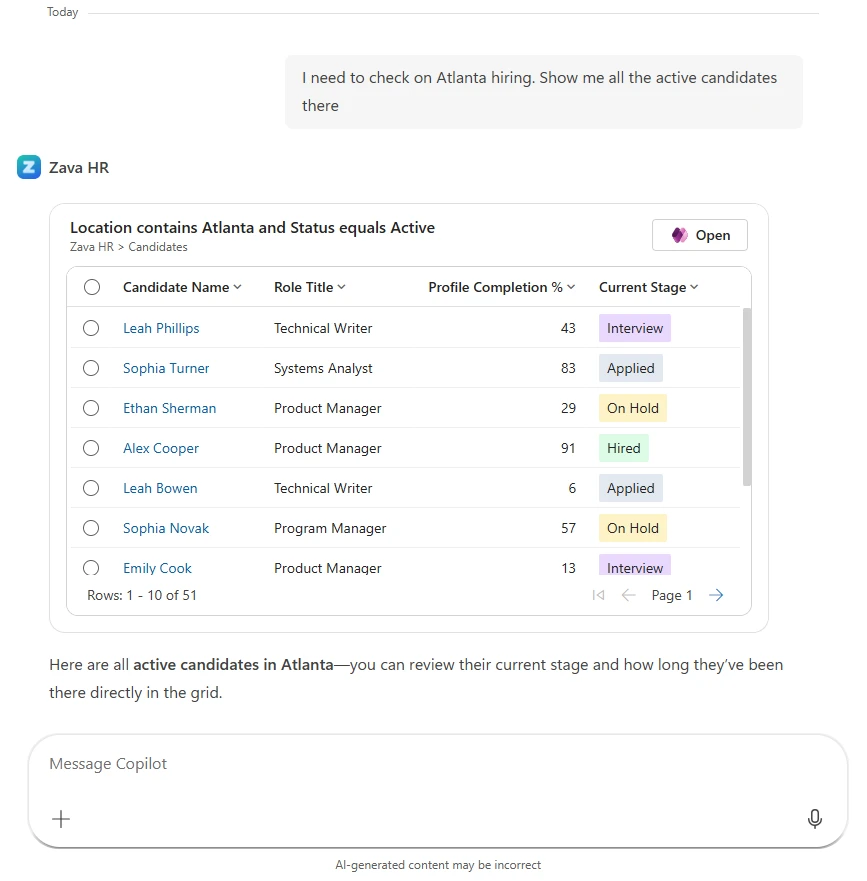
Grids — explore your data without leaving the conversationAsk Copilot a question about your business data — “Show me open accounts in the West region” or “Which cases were escalated this week?”— and it responds with an interactive grid drawn directly from your Power Apps data. Users can filter, sort, and scan records using the same views and permissions as the app itself.
Selecting a record opens it inline, where users can review details, make edits, or keep the conversation going — asking follow-up questions, comparing records, or taking the next step without starting over. And when users need a full screen experience, a deep link is always available — one click takes them directly to the relevant view or record in the full app.
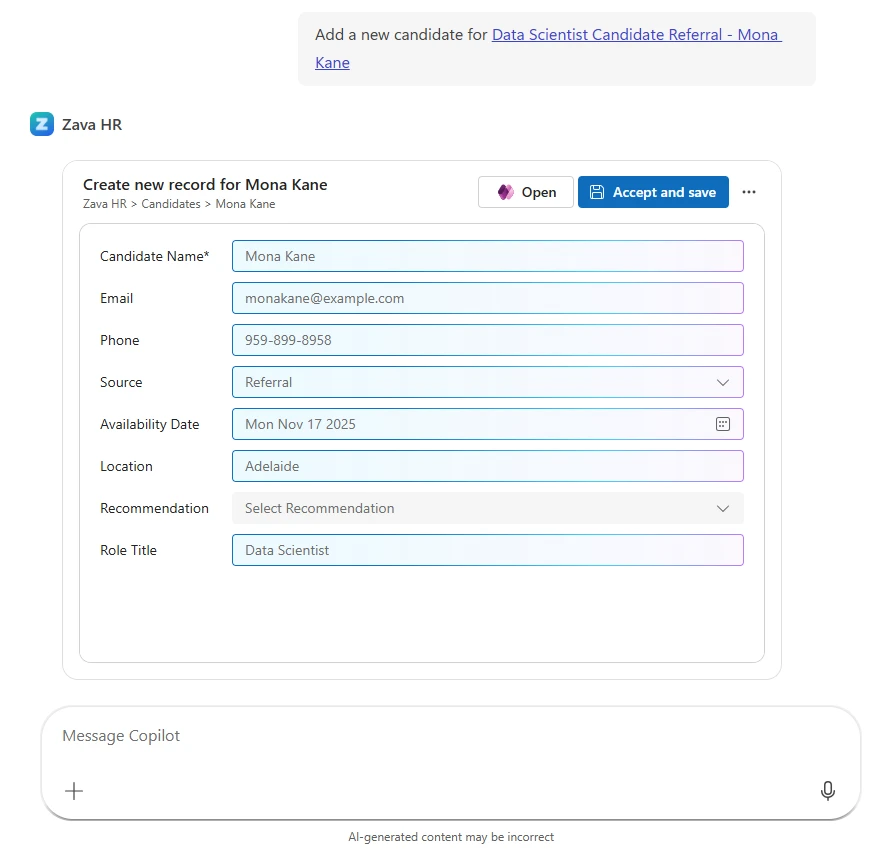
 Forms — create, view, and update records without leaving Copilot
Forms go beyond read-only access. Users can create new records, view existing ones, or update fields—all directly in Copilot. Imagine receiving a supplier email and asking Copilot to create a new account record from it, or reviewing a contract in Word and logging the key details into your CRM without switching apps.
Copilot surfaces the right form and, using the same underlying technology as the data entry agent in Power Apps model‑driven apps, intelligently predicts field values based on the context at hand — reducing manual input and making data entry feel effortless.
 Available across the Microsoft 365 apps you already use
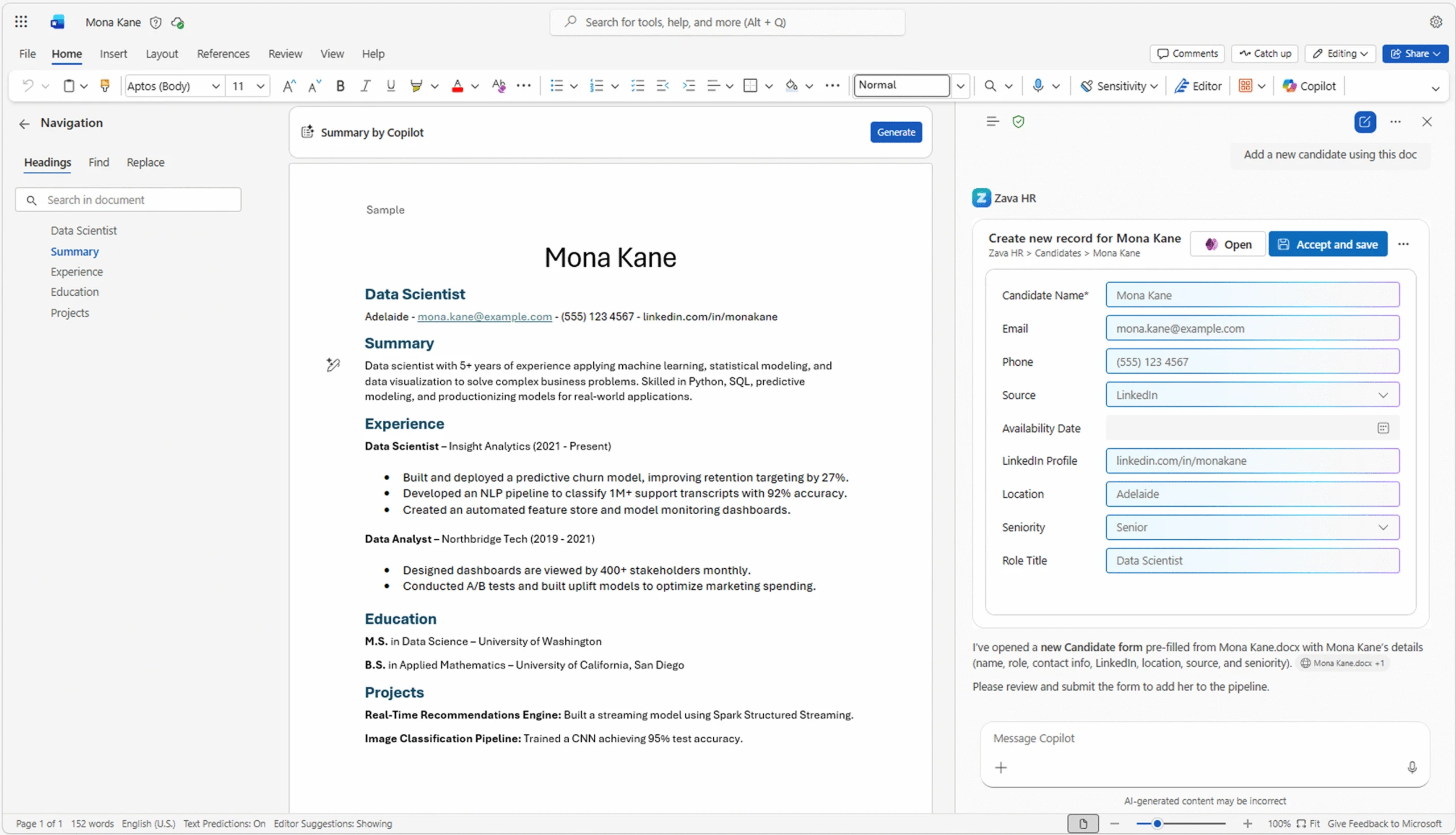
These experiences aren’t limited to the Copilot chat canvas. They’re available in the Copilot surfaces across Microsoft 365—Word, Excel, PowerPoint, and more—so users can access and act on their business data right alongside the document, spreadsheet, or presentation they’re working in.
Imagine drafting a proposal in Word, opening Copilot directly within the application, and creating a new account record with fields prefilled from the document—without switching apps, without copy and pasting, without losing context.
Need to go deeper? Both grids and forms include a deep link into the full model-driven app. One click takes users directly to the relevant record or view—no navigation, no searching, context preserved. It’s not a context switch; it’s a handoff to exactly where they need to be.
For scenarios where a grid or form isn’t sufficient, makers can build custom tools — defining their own logic and UX to meet the specific needs of their users.
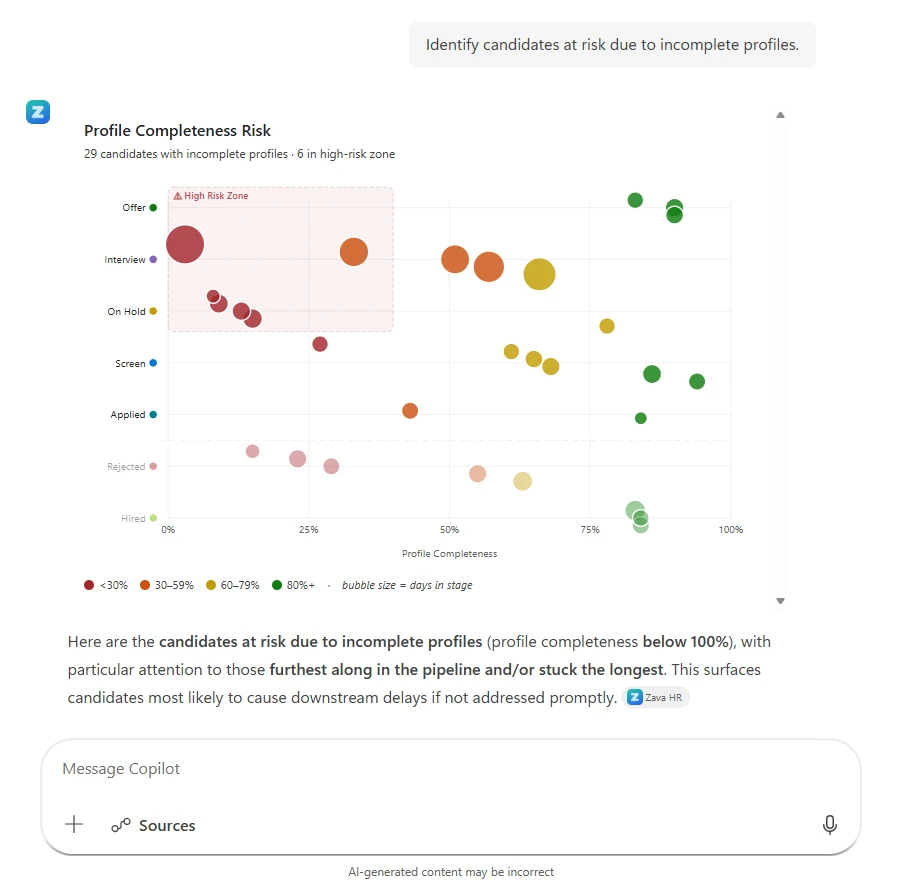
Grids, forms, and custom tools are the foundation. As we learn from this preview, we’ll expand the ways makers can extend their apps into Copilot — across more surfaces, more scenarios, and deeper integrations with the Microsoft 365 ecosystem.
Available now — get started todayYour model-driven apps are now available in Microsoft 365 Copilot in public preview. Once a maker activates their app’s MCP server for a model-driven app, grids and forms will light up in Copilot automatically – no redesign required.
Requires a Power Apps model‑driven app with Dataverse. This preview requires a Microsoft 365 Copilot license and a Power Apps Premium license. Custom tools—for exposing app‑specific actions beyond grids and forms—will be available in the coming weeks. Stay tuned!
| # | Наименование новости | Тональность | Информативность | Дата публикации |
|---|---|---|---|---|
| 1 | Custom tools and rich UI for app-based conversations are now in Public Preview | 0 | 9.53 | 22-04-2026 |
| 2 | What’s new in Power Platform: February 2026 feature update | 0 | 11.19 | 17-02-2026 |
| 3 | 2026 release wave 1 plans for Microsoft Dynamics 365, Microsoft Power Platform, and Copilot Studio offerings | 0 | 11.66 | 18-03-2026 |
| 4 | What’s new in Power Platform: March 2026 feature update | 0 | 8.11 | 19-03-2026 |
| 5 | Going beyond text in Microsoft 365 Copilot – Introducing SharePoint Copilot Apps | 0 | 9.53 | 23-06-2026 |
| 6 | Power Apps MCP server introduces closed-loop learning for enterprise agents | 0 | 9.76 | 12-05-2026 |
| 7 | New quality updates to modern controls in canvas apps | 0 | 7.07 | 25-02-2026 |
| 8 | Power Platform Monitor Alerts Are Now Generally Available | 0 | 6.11 | 08-04-2026 |
| 9 | Building trustworthy AI: A practical framework for adaptive governance | 0 | 8.44 | 01-04-2026 |
| 10 | Microsoft 365 Copilot 16.0.20228.20042 beta by Microsoft Corporation | 0 | 1 | 07-07-2026 |