Просмотр новости
Найдите то, что Вас интересует
 Спутники
 РН
РН SpaceX
 Роскосмос
 NASA
NASA
СпутникиРНSpaceXРоскосмосNASAWelcome to the Power Platform monthly feature update! We will use this blog to share news in Power Platform from the last month, so you can find a summary of product, community, and learning updates from Power Platform in one easy place.
The post What’s new in Power Platform: March 2026 feature update appeared first on Microsoft Power Platform Blog.
Summary Welcome to the Power Platform monthly feature update! We will use this blog to share news in Power Platform from the last month, so you can find a summary of product, community, and learning updates from Power Platform in one easy place. Now, let’s dive into what’s new in Power Platform:
Managed platform Licensing capacity reportingLicensing capacity reporting is now fully available in the Power Platform admin center (Licensing → Power Automate → Usage), giving admins a single place to see which users are over capacity and which flows are driving that usage. Export options, a consolidated licensing page, and additional improvements are on the way.
Power Platform inventory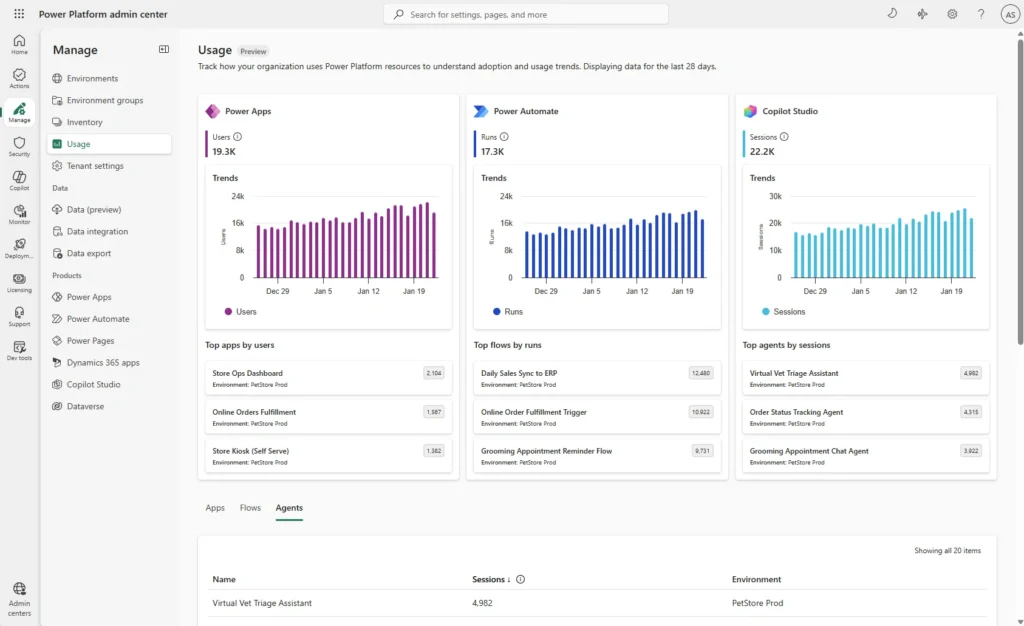
Power Platform inventory is now generally available, giving tenant administrators a unified view of cloud flows, Copilot Studio agent flows, and Workflows agent workflows across every environment. Expansion with connectors, actions, and key usage data is on the way — making it even easier to spot your most active automations, enforce compliance, and prevent orphaned resources.
The new usage pageThe new usage page is now in public preview with modern dashboards showing adoption trends and resource-level analytics for Power Apps, Power Automate, and Copilot Studio. For Power Automate, the page already shows flow run data so you can track execution patterns across your tenant.
Agentic apps Bringing Microsoft 365 Copilot into model-driven apps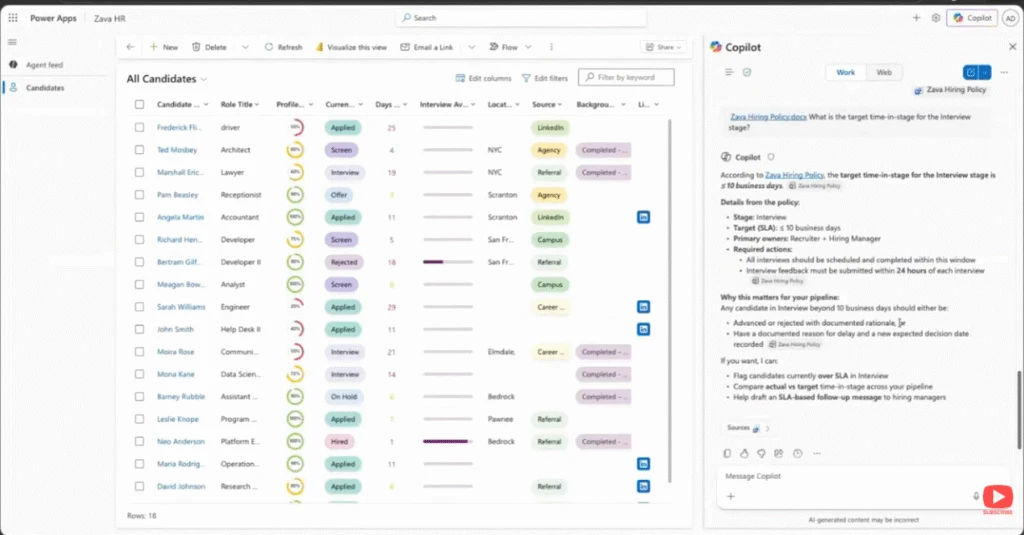
In this demo from the Microsoft 365 & Power Platform Community call, you see how Microsoft 365 Copilot integrates with model-driven Power Apps to answer questions about your app data, generate visualizations using code interpreter, and take action across Microsoft 365. You’ll see how Copilot uses app and data context to generate documents, create presentations, and even schedule meetings—all directly from your app
Turn app data into action with Microsoft 365 Copilot
Previously, we walked through how to enable Microsoft 365 Copilot in model-driven apps. Now it’s time to put it to work where your business processes actually run. In the Copilot side pane, you can ask Copilot to summarize table data, visualize what’s active, see what’s pending, recap the history of a specific record, and reference related content surfaced through Work IQ. The result is a more natural transition from “what’s going on?” to “what should I do next?” without ever leaving the app.
Because this experience is powered by Microsoft 365 Copilot, you can also bring in the right agent at the right moment. You can @mention first‑party agents like Researcher and Analyst, or involve a custom agent your organization has made available. That agent collaboration helps turn insights into action, whether that means drafting a document, creating a PowerPoint, or taking next steps like scheduling a meeting. All of this stays grounded in your app context and chat history. Ready to get started? Begin with the admin and maker setup guidance, then explore how end users work in the pane, and finally learn how to tailor the experience with agents.
Building modern apps New quality updates for modern controls in canvas apps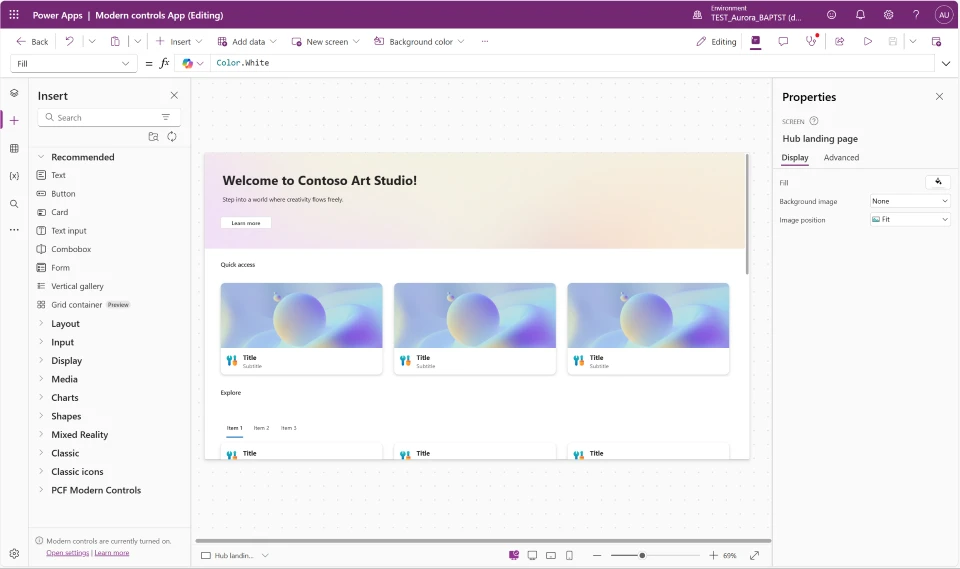
We’ve shipped quality updates across all nine modern controls in Power Apps canvas apps—Text, Number Input, Date Picker, Text Input, Tab List, Combo Box, Radio, Link, and Info Button. This is one of the most comprehensive control refreshes to date, addressing top maker feedback around consistency, reliability, and flexibility. Whether you’re building new apps or maintaining existing ones, these updates make modern controls noticeably better to work with.
The biggest improvements are in consistency, performance, and developer experience. Controls now share a unified property model with standardized names and typed enum values predefined value sets, which means better IntelliSense, fewer formula errors, and less guesswork. The OnChange behavior has been refined across controls to fire at the right moments—reducing unnecessary recalculations and making apps feel faster and more responsive. Mobile-optimized defaults are also now applied automatically when you add controls to a mobile layout.
Migration is guided every step of the way. When you open an app using a previous version of a modern control, you’ll see an in-product notification with a “learn more” link and an “update” button coming soon on all controls. Dedicated per-control migration guides walk you through every property rename and formula change needed—so you stay in control of when and how you upgrade.
AI powered development vibe.PowerApps.com Walkthrough
This video explores the new vibe.powerapps.com preview, which enables developers to build full code Power Apps from a prompt using AI-driven plan, data, and app generation. You’ll see how the unified experience simplifies app creation, editing, and publishing without requiring VS Code or manual code authoring.
Power Automate Object-centric process mining analyzes processes by following real interacting business objects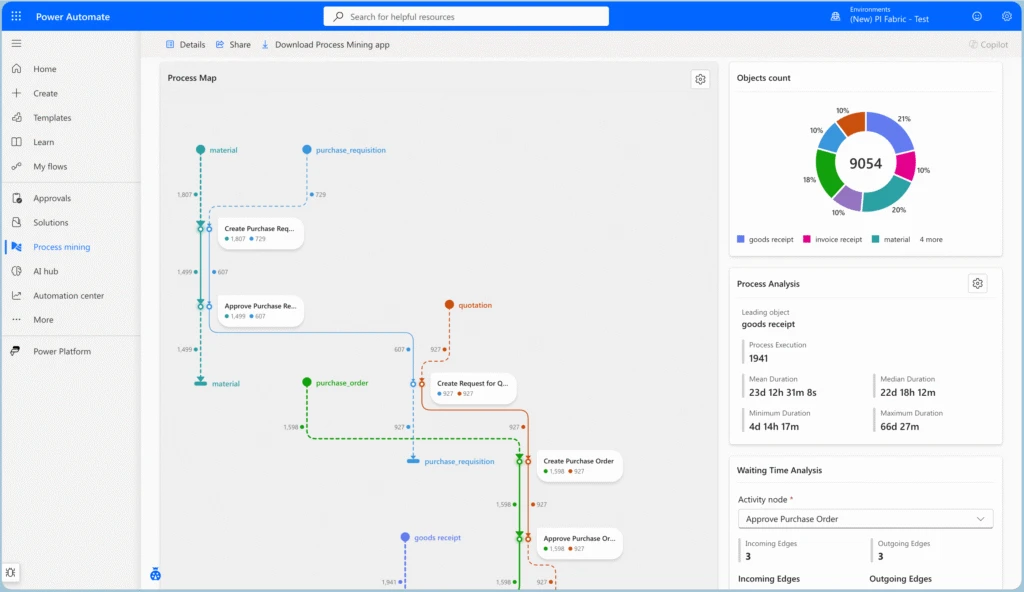
Object-Centric Process Mining (OCPM) is a new approach to process analysis in Power Automate Process Mining that models processes as they occur in real business environments. Unlike traditional case-centric process mining, which groups events under a single case notion (e.g., Order ID), OCPM allows a single event to belong to multiple objects and object types — such as orders, invoices, deliveries, and payments — preserving the full web of interactions and dependencies end-to-end.
This capability solves a fundamental limitation of case-centric mining: when events routinely touch several objects of different types simultaneously, forcing them into a single case can hide cross-object relationships, duplicate events, or distort metrics. OCPM keeps these relationships explicit, rendering object-centric process maps that show object lifecycles, activity nodes spanning multiple object types, and color-coded object-flow edges. This makes it straightforward to identify multi-object bottlenecks, verify compliance policies that span entities (e.g., “ship only after payment”), and analyze how different process flows converge and interact.
OCPM is ideal for scenarios where dependencies across object types drive outcomes — such as order-to-cash, procure-to-pay, or supply chain processes — while case-centric mining remains the right choice for tightly scoped, single-instance workflows.
Process intelligence experience: a customizable interface for process analysis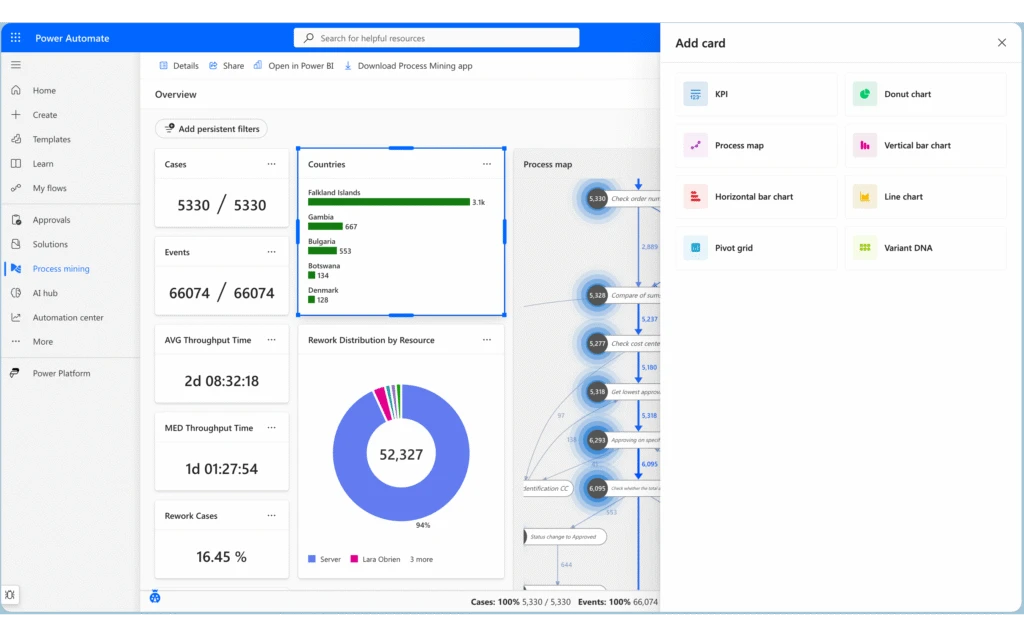
The process intelligence experience is the next-generation interface for process analysis in Power Automate Process Mining. It replaces the previous fixed process overview with a flexible, card-based dashboard system that adapts to your analysis needs. Users can create multiple tabs to organize different analytical perspectives, apply dynamic filters across all visualizations, and arrange, resize, and configure cards to build personalized analytical workspaces.
Key enhancements include the ability to group related metrics and visualizations together logically, switch between preconfigured analytical perspectives instantly, and share dashboard configurations with team members. Continuous data refresh ensures you’re always working with current information, while the customizable layouts give you complete control over what you see and how you see it — enabling tailored views for different stakeholders and use cases.
Power Pages Infuse intelligent experiences into Power Pages sites with the new Agent API
Agent API for Power Pages enables site creators to build custom chat and other user experiences and integrate these seamlessly with their custom-built Microsoft Copilot Studio agents. This enhancement gives organizations more flexibility for integrating intelligence into their web experiences.
Public preview: Build Power Pages sites with AI using agentic coding toolsWe’re announcing the public preview of the Power Pages plugin for GitHub Copilot CLI and Claude Code. Describe the site you want in natural language and the plugin handles the rest — from project scaffolding and setup to Web API integrations, permissions, and site deployment.
The plugin is purpose-built for Power Pages. It understands table permissions, web roles, site settings, authentication configuration, and Web API patterns. Because it generates platform-aware code, you spend less time on manual configuration and more time building your site.
Learning updates Training paths and labsUpdated training
New
Updated
New
Updated
New
Updated
New
Updated
Updated
New
Updated
| # | Наименование новости | Тональность | Информативность | Дата публикации |
|---|---|---|---|---|
| 1 | What’s new in Power Platform: February 2026 feature update | 0 | 11.19 | 17-02-2026 |
| 2 | 2026 release wave 1 plans for Microsoft Dynamics 365, Microsoft Power Platform, and Copilot Studio offerings | 0 | 11.66 | 18-03-2026 |
| 3 | Custom tools and rich UI for app-based conversations are now in Public Preview | 0 | 9.53 | 22-04-2026 |
| 4 | New quality updates to modern controls in canvas apps | 0 | 7.07 | 25-02-2026 |
| 5 | Power Platform Monitor Alerts Are Now Generally Available | 0 | 6.11 | 08-04-2026 |
| 6 | Public Preview: Your business apps, now part of every conversation | 0 | 10.63 | 02-04-2026 |
| 7 | Building trustworthy AI: A practical framework for adaptive governance | 0 | 8.44 | 01-04-2026 |
| 8 | Power Apps MCP server introduces closed-loop learning for enterprise agents | 0 | 9.76 | 12-05-2026 |
| 9 | SharePoint Framework (SPFx) roadmap update – July 2026 | 0 | 11.82 | 30-06-2026 |
| 10 | Power Fx: User Defined Types Generally Available | 0 | 11.86 | 13-05-2026 |