Просмотр новости
Найдите то, что Вас интересует
 Спутники
 РН
РН SpaceX
 Роскосмос
 NASA
NASA
СпутникиРНSpaceXРоскосмосNASAThe Member Directory and Profile Pages Add On uses a single Google Maps API key for two different jobs: rendering the interactive member map in the browser with the Google Maps JavaScript API, and converting member addresses into map coordinates with the Google Geocoding API. Both calls read that same key from Memberships > Settings (more...)
The Member Directory and Profile Pages Add On uses a single Google Maps API key for two different jobs: rendering the interactive member map in the browser with the Google Maps JavaScript API, and converting member addresses into map coordinates with the Google Geocoding API. Both calls read that same key from Memberships > Settings > Advanced.
That single key forces a tradeoff. Restrict it by HTTP referrer, the way Google recommends for any key exposed in browser JavaScript, and your server-side Geocoding API calls stop working, since Google cannot validate a referrer on a request that never came from a browser. Leave it unrestricted so geocoding keeps working, and you have a public API key anyone can find in your page source and use on their own projects at your expense.
This code recipe shows you how to use the pmpromd_maps_geocoding_api_key filter to give geocoding its own private key. With two keys, you can restrict each one properly: the public key by HTTP referrer, the geocoding key by server IP address, exactly as Google’s documentation recommends.
This recipe is worth adding if any of the following apply to your site:
If your Maps API key is already restricted and your map still works, or you are not concerned about the key being public, this recipe is optional.
Best Practices and ConsiderationsGoogle Cloud lets you restrict an API key in one of two ways: by HTTP referrer (for keys used in browser JavaScript) or by IP address (for keys used in server-side calls). You cannot apply both restriction types to the same key. That is the core reason to split the key:
Enable the Geocoding API on the new key. When you create the second key in Google Cloud Console, restrict it to the Geocoding API specifically. A key with no API restrictions works, but it defeats the purpose of separating them.
About the Code RecipeThe pmpromd_maps_geocoding_api_key filter runs right before the Member Directory and Profile Pages Add On sends a geocoding request to Google. Internally, the Add On calls apply_filters( 'pmpromd_maps_geocoding_api_key', $map_api_key ), passing in the key currently configured on the Advanced settings page. Your callback receives that value and returns the key you want used instead.
Returning a different string here overrides the key for geocoding calls only. Your Advanced settings page key still handles the front-end JavaScript map, untouched.
Step-by-Step Implementation GuideNEW_KEY_HERE with your new key.When you are done, your Credentials page should show two separate API keys, each with its own restriction type.
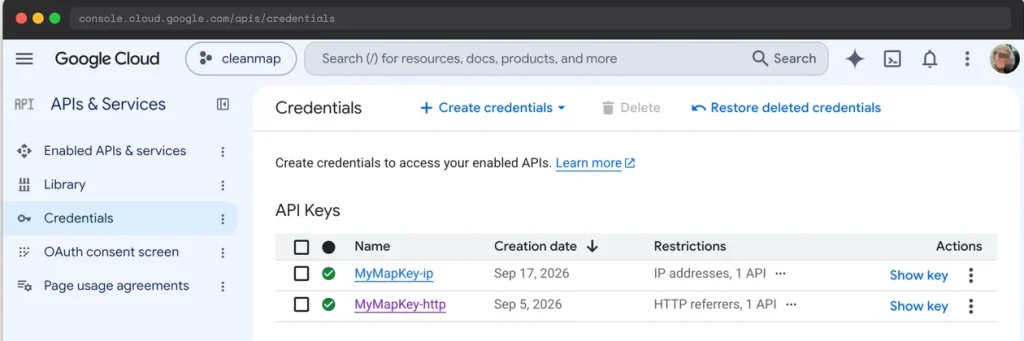 Two restricted keys: one for the browser-facing Maps JavaScript API, one for server-side geocoding.The Code RecipeAdding the Recipe to Your Website
You can add this recipe to your site by creating a custom plugin or using the Code Snippets plugin available for free in the WordPress repository. Read this companion article for step-by-step directions on either method.
How to Customize This Code RecipeNEW_KEY_HERE with your restricted geocoding API key.wp-config.php constant instead of hardcoding it in the snippet, swap the assignment for something like $key = defined( 'PMPRO_GEOCODING_API_KEY' ) ? PMPRO_GEOCODING_API_KEY : $key;.Author: Kim White
Kim White is a Technical Support Engineer here at PMPro. She has a great intuition for unraveling information and coming up with a solution. She’s been building and maintaining websites since 1998 and enjoys helping people make the most of their WordPress membership sites. Kim also organizes her local WordPress WordCamp and Meetup.
Have a question about how to use this feature? Our Support Page outlines three ways to get support.
Our Max plans include hands-on help customizing your membership site and implementing new features. Upgrade to PMPro Max now »
Was this article helpful?
YesNo
| # | Наименование новости | Тональность | Информативность | Дата публикации |
|---|---|---|---|---|
| 1 | How to Build a Private Vendor Portal or Gated Catalog with Paid Memberships Pro | 0 | 9.29 | 18-09-2026 |
| 2 | Offer Members a Discounted Rate for Upgrading to a Higher Level | 0 | 6.53 | 16-09-2026 |
| 3 | Import User Meta Fields Stored as an Array via CSV | 0 | 11.81 | 15-09-2026 |
| 4 | Protect an MCP server with an Authorization Server | 0 | 7.35 | 15-06-2026 |
| 5 | Scaling for High Traffic Websites: How to Improve WordPress Site Performance | 0 | 9.22 | 21-09-2026 |
| 6 | Offer Multiple Payment Methods to Increase Conversions | 0 | 7.9 | 21-09-2026 |
| 7 | digital tourism and mapping remote places | 0 | 7.3 | 03-08-2026 |
| 8 | Integrating Third-Party APIs to Enhance Website Functionality and Business Efficiency #businesstools #programming | 0 | 12.66 | 21-06-2026 |
| 9 | Tourism and Digital Mapping: Documenting Local Places with OpenStreetMap | 0 | 7 | 08-08-2026 |
| 10 | CookieAdmin 1.2.2: Geotargeting | 2 | 6 | 11-07-2026 |
